Snib remembers the bills, renewals and appointments you don't.
Stop organising your life. Just tell it.
Say it, type it or photograph it. Snib works out what it is, when it matters and how hard it should chase you, then schedules the reminders itself. No date pickers, no folders, no lists to keep tidy.
Coming to the App Store shortly. One email at launch, then nothing.
Snib · 2 days before
Council rates, $410.20, due Thursday.
Still time to pay it without a late fee.
WHAT IT IS FOR
A to-do app assumes you already know what you have to do.
Life admin is the opposite problem. The thing that costs you is the thing you never wrote down: the trial that converts on Thursday, the registration that lapsed last month, the referral that expires before the appointment you booked around it.
Snib is built for what missing something actually costs, not for how tidy a list looks. It has no projects, folders, tags, streaks or badges, and it is not getting them. Every one of those asks you to organise, which is the work this app exists to remove.
SEE IT WORK
Messy in. Dated, priced and scheduled out.
WHAT YOU GIVE IT
“netflix trial ends thursday, cancel before they charge me 22.99”
WHAT SNIB MAKES
CANCEL
$22.99
Netflix free trial
Thursday 20 Aug · Converts to paid
A trial gets chased harder than anything else its size, because catching one before it converts hands you real money.
HOW IT WORKS
Three steps, and you only do the first one
Tell it, however it comes out
Type a line, hold the button and speak, or photograph the bill. There is no date picker, no category and no list to file it under. The moment an app asks you to organise something, it has handed the work back to you.
It works out what you meant
Five layers of understanding, cheapest first. Two thirds of ordinary typed notes are answered on the device itself, instantly, without calling a model at all. Only the genuinely messy ones go further.
It chases you properly
Not one alarm. A ladder of them, sized to what missing this particular thing would actually cost you, and quiet between 9:30pm and 7:30am so it never wakes you.
THE REMINDER LADDER
One alarm is why you miss things
Snib works out how much each item matters from its type, its amount and the words around it, then builds a schedule to match. You never set this, and you never see a priority picker. Nothing sounds between 9:30pm and 7:30am.
Car registration
$892.50CriticalStarts a month out30 days
7 days
2 days
On the day
Overdue
due date →
Netflix renewal
$22.99StandardThe day before is plenty1 day
On the day
due date →
THE DETAILS THAT MATTER
The decisions other reminder apps skip
Nothing ever fires at the deadline
A notification at 3pm about something due at 3pm is a notification about something already lost. Timed items warn the night before and again ninety minutes out, which is still enough time to pay it or send it.
It decides how much each thing matters
Standard, important, critical, inferred from the type, the amount and the words that signal consequence. A $22 subscription and an $892 registration should never get the same schedule, and you should never have to say so.
Photos never leave your phone
A bill, a prescription, an appointment card. The image is read on the device and never uploaded, to us or to anyone. Only the text it found can travel, and only when the on-device model needs help.
Reminders do not depend on our servers
Every reminder is scheduled with iOS directly. They fire with the app force quit, in aeroplane mode, and on a day our backend is down. Tested on a real phone with the network switched off.
It understands things that depend on each other
“Bloods before the specialist on the 30th” becomes two commitments and a link. Nothing else in this category chains life admin, because chaining requires understanding the sentence rather than matching a date in it.
It gets cheaper the more you use it
The third time you enter the same shape of bill, Snib recognises it and stops asking a model. Learned patterns stay on the device, never sync, and rebuild themselves if lost.
Every item shows the words that made it
Open anything and you can see exactly what you typed or said. A wrong reading is always fixable in two taps rather than mysterious, and your original words are never edited or deleted.
One summary in the morning, not six pings
What is overdue, what is due, and what is about to leave your account, in a single notification. Silent on empty days, because a daily “nothing today” is how people learn to mute an app.
THE ACTUAL APP
Three screens. No sixth tab.
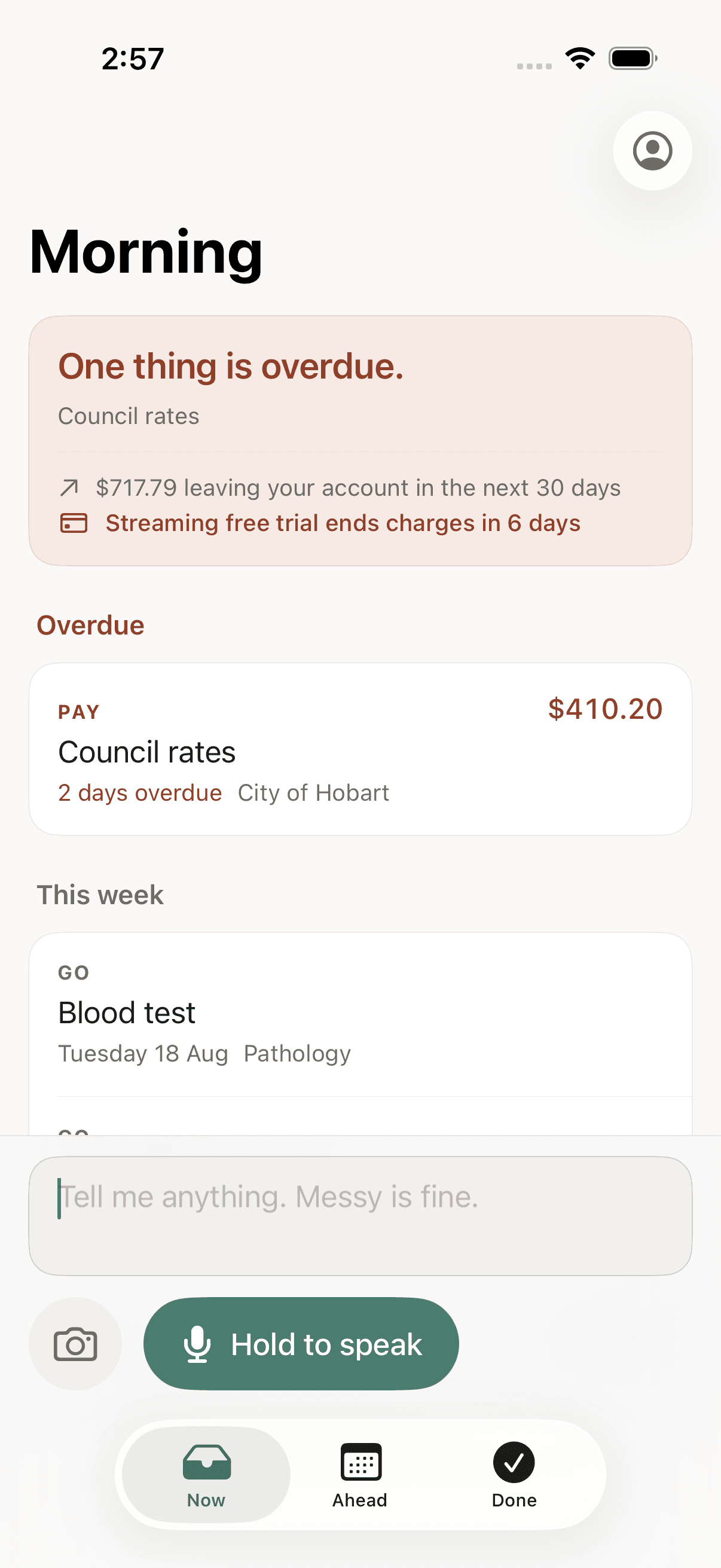
Now
What is overdue, what is due, and what is about to leave your account, before any list.
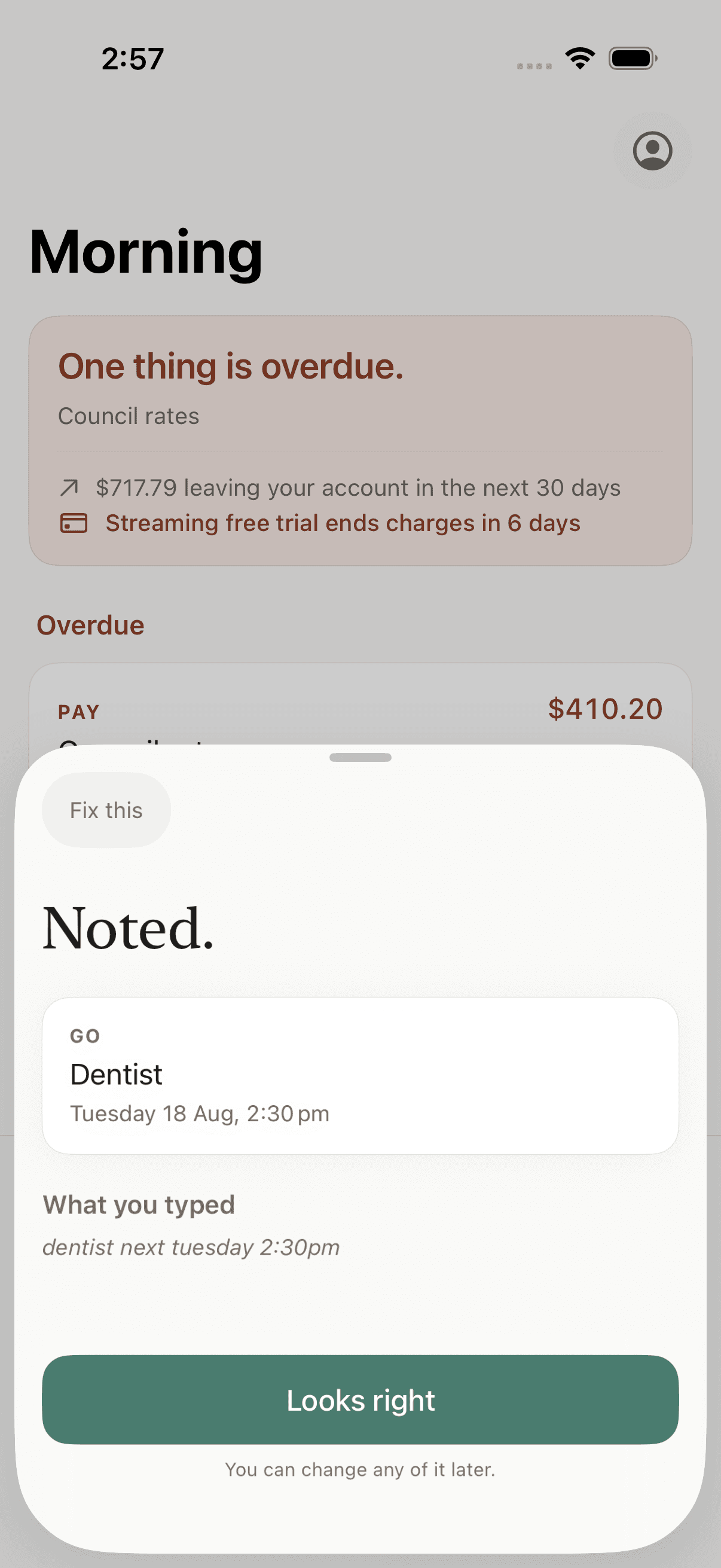
The reveal
The card appears on the same frame you hit send, with the words that made it kept underneath.
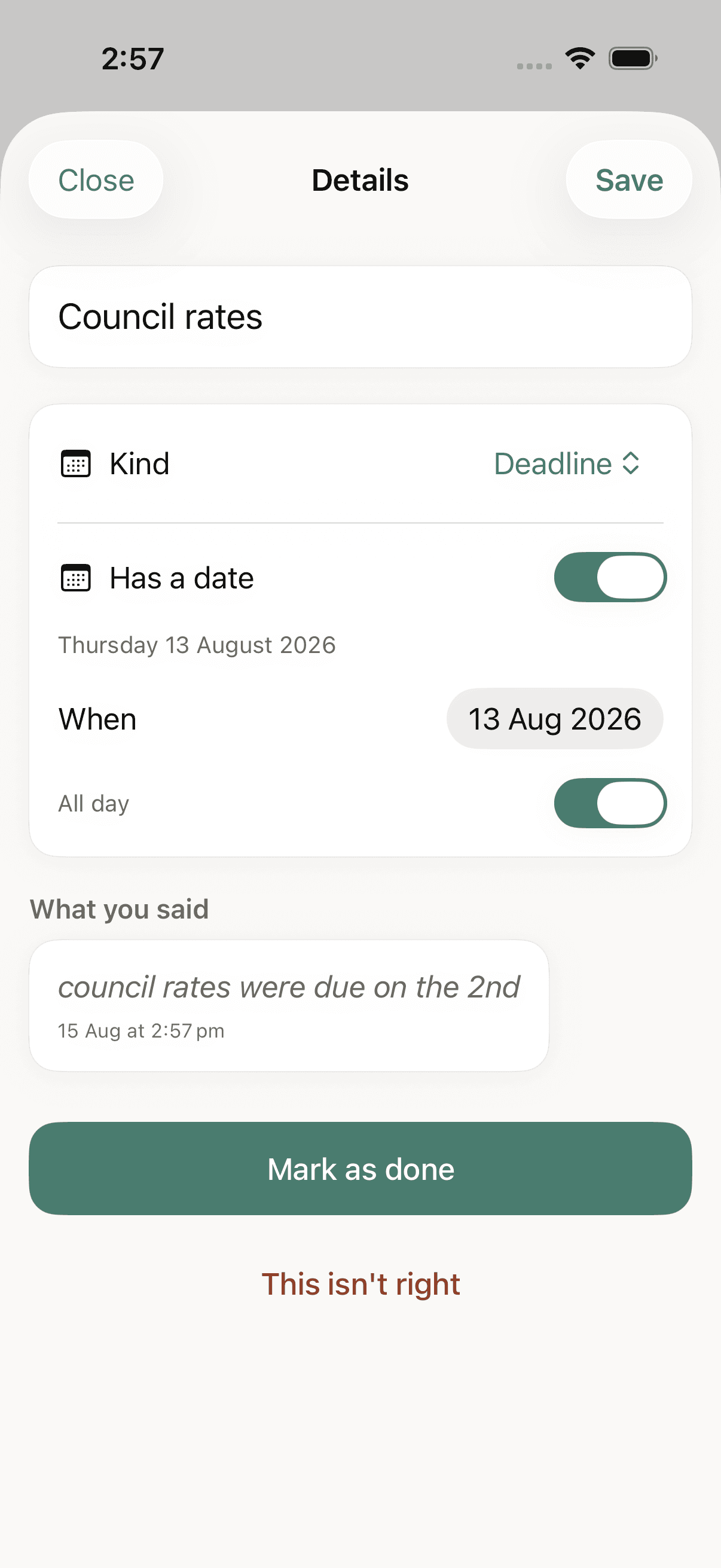
Provenance
Every item can show exactly what you said. A wrong reading is fixable, never mysterious.
It holds your money and your health. So it is careful.
Everything lives on your phone first, and the app works fully without an account. Photos are read on the device and never uploaded. If you sign in, your backup is stored in Sydney. No ads, no tracking, and nothing sold or shared for marketing. Export everything or delete everything from inside the app, in one tap.
Read the full privacy policyPRICING
The reminders are free. All of them.
Paying only ever buys you more ways to get things in. It never buys you a reminder the free tier withholds.
Free
- Unlimited typed captures
- 20 voice notes a month
- 3 photo scans a month
- Every reminder feature, nothing held back
Plus
Most people- Everything in Free
- Unlimited voice capture
- 3 photo scans a month
Pro
- Everything in Plus
- Unlimited photo scanning
- For anyone whose admin arrives on paper
Monthly only, no annual lock-in, cancel any time in your Apple account settings. A billing problem will never lock you out of your own data or stop a reminder from firing. Prices are in Australian dollars and include GST where it applies. Full detail in the terms.
QUESTIONS
Everything people ask before they install it
What is Snib?
Snib is an iPhone app that turns messy notes into scheduled reminders for life admin: bills, renewals, subscriptions, appointments and deadlines. You type, speak or photograph whatever you need to remember, and Snib works out what it is, when it is due, how much it costs and how urgently it should chase you, then schedules the reminders itself.
Is Snib a to-do app?
No, and deliberately so. A to-do app assumes you already know what you have to do and just need somewhere tidy to put it. Snib is built for the opposite problem: the thing that costs you money is usually the thing you never wrote down. Snib has no projects, folders, tags, streaks or badges, and will not be getting them, because every one of those asks the user to organise, which is the work the app exists to remove.
How is Snib different from the iPhone Reminders app?
Apple Reminders stores what you tell it. Snib interprets it. Reminders needs you to supply a title, a date and a time; Snib reads all three out of a sentence like “rego due 30 september 892.50” and then decides the reminder schedule from the amount and the type. Reminders gives every item the same single alert. Snib gives an $892 car registration a ladder starting a month out and a $22 streaming renewal a single nudge the day before, without ever asking you to rank anything.
Does Snib work without an internet connection?
Yes. Capture works offline, and reminders are scheduled with iOS directly rather than pushed from a server, so they fire with the app closed, in aeroplane mode, and on a day the servers are down. An internet connection is only used when a capture is too ambiguous for the on-device model, and when you have signed in and are backing up.
Do I need an account to use Snib?
No. Snib works fully without an account and everything is stored on your phone first. Signing in with Apple is optional and only enables backup and sync across your devices. If you never sign in, your phone holds the only copy of your data.
What happens to a photo of a bill when I scan it?
The image is read on your device using Apple's on-device text recognition, and the photograph is never uploaded, to Snib's servers or to anyone else's. Only the text found in it can travel, and only when the on-device model cannot resolve the capture on its own.
Can Snib remind me before a free trial converts to a paid subscription?
Yes, and it treats that case as urgent on purpose. Tell Snib when a trial ends and it schedules the reminder early enough to actually cancel, because catching a trial before it converts is the clearest money the app can save you. It handles the same job for annual subscription renewals and for anything that charges a card automatically.
Will Snib remind me about a car registration renewal?
Yes. A registration renewal is exactly the kind of high-cost, once-a-year deadline Snib is built for. Because the amount is large, Snib classifies it as critical on its own and starts warning roughly a month before it is due, then again a week out, two days out, on the day, and once more if it lapses.
How much does Snib cost?
Snib is free, and every reminder feature is in the free tier. The free plan includes unlimited typed captures, 20 voice notes and 3 photo scans a month. Snib Plus is A$5 a month for unlimited voice capture, and Snib Pro is A$9 a month for unlimited voice and unlimited photo scanning. Both are monthly only, with no annual lock-in, and are cancelled in your Apple account settings.
Where is my data stored?
On your phone first, always. If you choose to sign in, a backup is stored with Supabase in the Sydney, Australia region, behind row-level security so your records are readable only by your own authenticated account, and encrypted in transit.
Can I export or delete everything?
Yes, both from inside the app and without emailing anyone. Export produces a complete machine-readable copy of every capture, commitment, link and reminder. Delete removes your account and every record from the servers and from the device, immediately and permanently.
Which countries can use Snib?
Snib is built in Australia and works anywhere. Dates are resolved against the time zone you were in when you captured them, so “tomorrow at 9” means tomorrow where you said it, and travelling across time zones rebuilds every reminder rather than leaving them to fire at 3am.
BUILT WITH