The Claude Code Mastery Roadmap: From Coding Assistant to AI Orchestration
Claude Code is one of the best environments out there for learning AI orchestration, not because it writes good code, but because of everything happening underneath that.
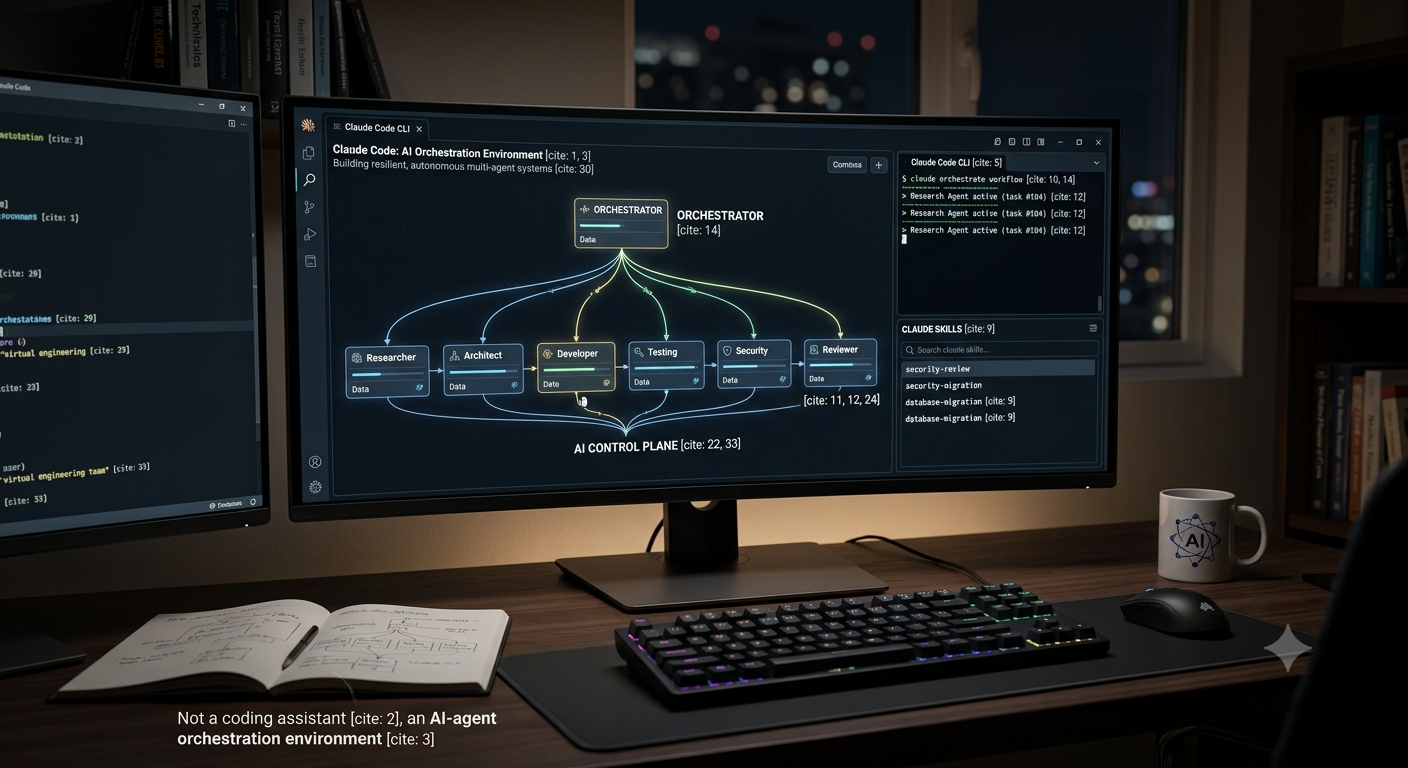
Here is the distinction worth making before anything else: this is not a guide to using Claude Code as a coding assistant. It is a guide to using Claude Code as an AI agent orchestration environment. Two very different skills wearing the same interface.
Anthropic's tooling moves fast, and this roadmap will keep tracking the current documentation and capabilities rather than locking in a workflow that goes stale in six months.
Here is the full path, level by level.
LEVEL 1: Claude Code fundamentals
Before anything advanced makes sense, you need to be genuinely comfortable with the basics:
- installation and configuration
- CLI
- projects
CLAUDE.md- permissions
- context management
- model selection
- sessions
/commands- slash commands
- configuration
- Git integration
- terminal/tool usage
- debugging
- planning
Goal: Claude Code becomes your daily engineering environment, not a novelty tab you open occasionally.
LEVEL 2: Claude Code as an engineering agent
Once the fundamentals are second nature, the real work starts. This is where you learn how Claude actually moves through a task:
Understand task
     ↓
Inspect repository
     ↓
Plan
     ↓
Use tools
     ↓
Modify files
     ↓
Run tests
     ↓
Inspect failures
     ↓
Fix
     ↓
Verify
     ↓
Commit
The goal at this level is understanding why each stage works, not memorising which commands trigger it. You'll dig into:
- tool use
- context engineering
- agent loops
- planning
- verification
- error recovery
- autonomous coding
- Git workflows
- test-driven agent workflows
LEVEL 3: Skills
This is where things get genuinely interesting.
You'll learn to build reusable Claude Skills, self-contained capabilities Claude can call on rather than something you retype every session:
.claude/
   skills/
      security-review/
      database-migration/
      api-development/
      testing/
      documentation/
      code-review/
Instead of typing out, every single time, "when reviewing code, check authentication, SQL injection, secrets, RBAC," you package that instruction once as a skill. Your system can then invoke it whenever the situation calls for it.
That habit, packaging judgement into something reusable rather than repeating yourself, is the first real taste of orchestration thinking.
LEVEL 4: Subagents
This level is not optional if orchestration is the goal.
You'll design specialised agents, each with a narrow job, working under a coordinator:
                    MAIN AGENT
                        │
          ┌─────────────┼─────────────┐
          ↓             ↓             ↓
     Researcher     Developer      Reviewer
          │             │             │
          ↓             ↓             ↓
       Web/API       Codebase       Security
A working set typically looks like this:
Research Agent investigates the problem and produces findings.
Architecture Agent designs the technical approach.
Developer Agent implements the solution.
Testing Agent tests what got built.
Security Agent actively tries to break it.
Reviewer Agent reviews the whole thing end to end.
The orchestrator's job is coordinating all of them, deciding who goes when, and what happens with what each one hands back.
LEVEL 5: Multi-agent systems
This is the level worth spending the most time on, because these patterns matter far more than any individual Claude command ever will.
Sequential, one agent finishes, the next picks up:
Agent A
  ↓
Agent B
  ↓
Agent C
  ↓
Final
Parallel, several agents work at once, then their output gets merged:
           ┌→ Agent A
Task ──────┼→ Agent B
           └→ Agent C
                 ↓
              Synthesis
Hierarchical, an orchestrator manages team leads, who manage their own agents:
             ORCHESTRATOR
             /          \
       Team Lead       Team Lead
       /     \         /      \
      A       B       C        D
Debate, two agents argue opposite conclusions, a third judges between them:
Researcher A ──┐
               ├── Judge
Researcher B ──┘
Critic loop, a builder and a reviewer go back and forth until the work actually holds up:
Builder
   ↓
Reviewer
   ↓
Problems?
 ┌─┴─┐
Yes  No
 ↓    ↓
Fix  Done
 ↓
Review
Learn these patterns properly and you will recognise them everywhere, not just in Claude Code.
LEVEL 6: MCP
Becoming genuinely good at MCP (Model Context Protocol) is non-negotiable here. The short version:
Claude + MCP = AI connected to real external capabilities.
Claude
  │
  ├── GitHub
  ├── PostgreSQL
  ├── Supabase
  ├── Slack
  ├── Jira
  ├── Google Drive
  ├── AWS
  ├── APIs
  └── Internal company systems
At this level you'll learn to:
- understand MCP architecture
- use MCP servers
- configure MCP
- build MCP servers
- expose tools
- expose resources
- control permissions
- secure MCP
- design enterprise MCP architectures
This one competency alone is a major chunk of what separates someone who prompts an AI from someone who architects AI systems.
LEVEL 7: Hooks and automation
This is where the system stops feeling like a chat tool and starts behaving like infrastructure.
Claude modifies code
       ↓
Hook triggered
       ↓
Run formatter
       ↓
Run tests
       ↓
Security scan
       ↓
Report results
You'll learn:
- lifecycle hooks
- automated validation
- policy enforcement
- security controls
- automated workflows
- deterministic guardrails
Hold onto this distinction, because it matters more than almost anything else on this list: agents are probabilistic. Hooks, and deterministic software generally, are what enforce the constraints you actually cannot afford to get wrong. That single idea is what separates an AI hobbyist from an AI architect.
LEVEL 8: Agentic software engineering
Eventually all of this comes together into something like this:
                 USER
                   │
                   ↓
             ORCHESTRATOR
                   │
       ┌───────────┼───────────┐
       ↓           ↓           ↓
   Planner      Researcher   Architect
       │           │           │
       └───────────┼───────────┘
                   ↓
                Builder
                   ↓
                Tester
                   ↓
              Security
                   ↓
                Reviewer
                   ↓
              Orchestrator
                   ↓
                 USER
Understanding this system means understanding who does what, when, why, with which model, using which tools, under what permissions, and how the output actually gets checked before it counts as done.
That full picture, not any single piece of it, is what orchestration actually means.
LEVEL 9: Production AI engineering
This is where the toy examples end and the real constraints show up. You'll need to get comfortable with:
- state
- persistence
- queues
- retries
- idempotency
- concurrency
- observability
- tracing
- evaluation
- token economics
- latency
- model routing
- failure handling
- security
- secrets
- RBAC
- human approval
- audit logs
A realistic flow at this level looks like this:
             USER REQUEST
                  ↓
             CLASSIFIER
                  ↓
        ┌─────────┴─────────┐
        ↓                   ↓
   Simple task          Complex task
        ↓                   ↓
   Small model        Orchestrator
                            ↓
                    Multiple agents
                            ↓
                     Verification
                            ↓
                       Human gate
                            ↓
                          Output
At this point you are no longer prompting Claude. You are building AI infrastructure, and it needs to be held to the same standard as any other infrastructure you would trust with production traffic.
LEVEL 10: AI Officer architecture
The final destination is being able to design something like this from scratch:
                    AI CONTROL PLANE
                           │
                    ┌──────┴──────┐
                    │ Orchestrator│
                    └──────┬──────┘
                           │
       ┌───────────────────┼───────────────────┐
       ↓                   ↓                   ↓
    Agents              Models              Tools
       │                   │                   │
       ├─ Research         ├─ Claude           ├─ APIs
       ├─ Coding           ├─ GPT              ├─ DB
       ├─ Security         ├─ Gemini           ├─ GitHub
       ├─ Analysis         └─ Local LLM        ├─ MCP
       └─ Review                                └─ SaaS
                           │
                           ↓
                    EVALUATION LAYER
                           │
                           ↓
                    GOVERNANCE LAYER
                           │
                           ↓
                    HUMAN OVERSIGHT
That is the ceiling this roadmap is aimed at.
The first project
No point spending weeks watching tutorials before touching anything real. The right way through this is building while learning.
Project: AI Software Engineering Team. A real repository where Claude Code runs as something closer to an artificial engineering team than a code assistant:
ai-engineering-team/

.claude/
├── agents/
│   ├── architect.md
│   ├── researcher.md
│   ├── developer.md
│   ├── tester.md
│   ├── security.md
│   └── reviewer.md
│
├── skills/
│   ├── code-review/
│   ├── security-review/
│   ├── testing/
│   └── documentation/
│
├── commands/
│   ├── build.md
│   ├── review.md
│   └── security.md
│
├── hooks/
│
└── CLAUDE.md
Then the goal is making it actually work, end to end, not just scaffolding it and calling it done. Every component in that folder gets built and understood on purpose, never copied blind from a template.
The standard worth holding yourself to
The point of this roadmap is not becoming "the person who knows Claude Code commands." That is a shallow ceiling.
The real target is being able to look at a business problem and say something like: "this should be a deterministic workflow, with Claude handling these two reasoning tasks, a specialised subagent handling research, MCP exposing these systems, a human approval gate right here, and automated evaluation right there." And then actually build it.
That is the skill that turns into a serious AI engineering, AI architecture, or AI transformation career. Not the commands. The judgement behind them.
The plan from here is to start with Claude Code architecture and fundamentals, then build up, piece by piece, toward a real multi-agent system.
TECHMOOSE AI
Ready to put AI to work in your business?
TechMoose AI builds voice agents and chatbots that answer calls, take bookings and handle support, live in minutes, not months.
Try TechMoose AI